Best Practices for SaaS Renewal Automation
Best Practices for SaaS Renewal Automation
SaaS renewals are critical for revenue stability, yet manual processes often lead to costly mistakes. Companies lose thousands annually to missed deadlines, unused licenses, and auto-renewals. Automating renewals can reduce errors, save money, and improve efficiency. Here's what you need to know:
- Why It Matters: Renewals account for 70% of B2B revenue. Poor management can cost a 50-person company up to $23,400 annually.
- Common Problems: Missed deadlines, outdated contact info, and "zombie" subscriptions (53% of SaaS licenses go unused).
- Benefits of Automation: Reduce missed renewals by 40–60%, recover 10–20% of lost revenue, and save $18,000–$35,000 annually for small businesses.
- Key Steps: Start renewal planning 120 days in advance, assign ownership, and use automated reminders at 90, 60, and 30 days.
- Data-Driven Decisions: Track usage, renegotiate terms, and forecast renewals with predictive analytics to improve retention rates and cut costs.
Automation transforms renewals into a streamlined process, saving time and money while boosting retention.
SaaS Renewal Management: Everything You Need To Know
Building a Structured Renewal Process
SaaS Renewal Timeline: 90-60-30 Day Process Framework
Setting Up a Renewal Timeline
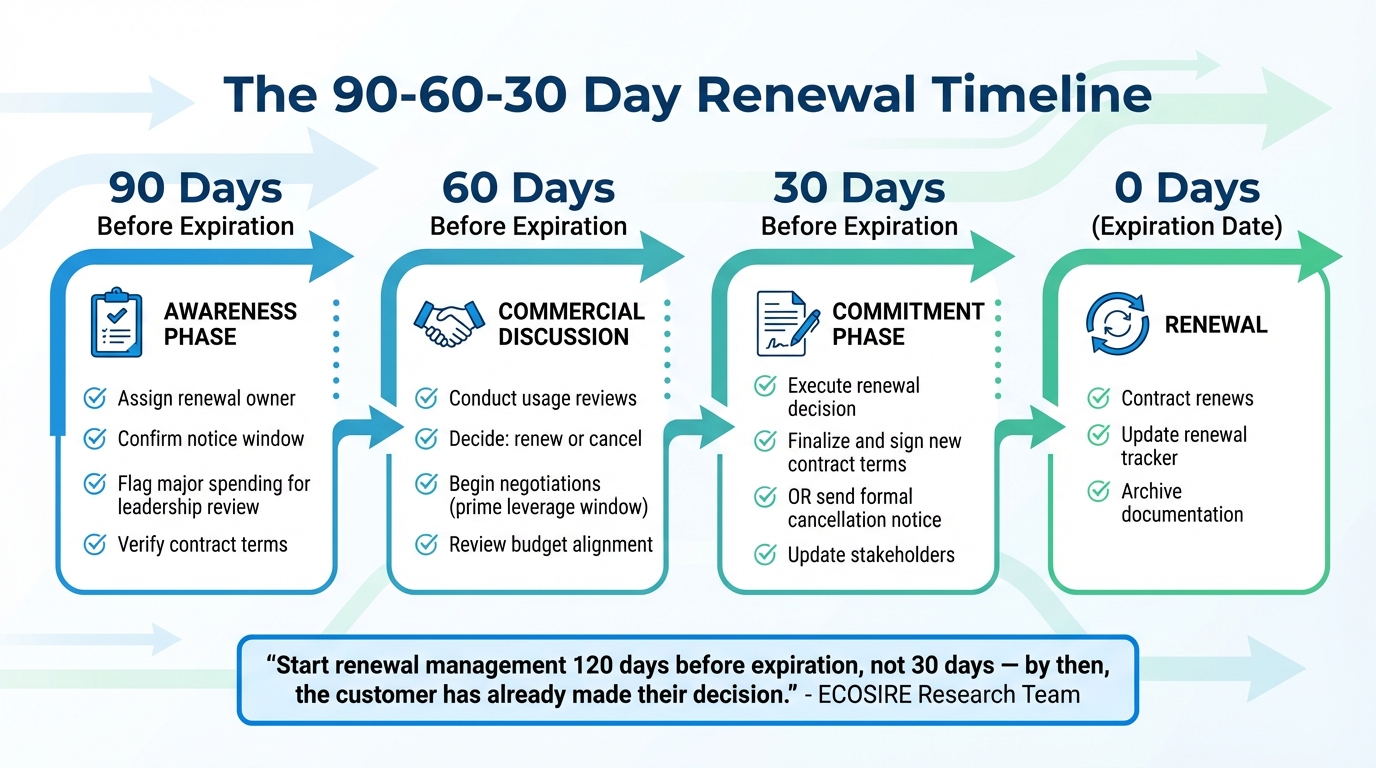
A well-organized 90-60-30-day renewal strategy can simplify the renewal process by breaking it into clear phases, each with specific objectives.
- 90 Days Out: Start by assigning ownership and flagging any major spending for leadership review. Confirm who is responsible for the renewal decision and double-check the contract's notice window.
- 60 Days Out: Conduct usage reviews and decide whether to renew or cancel. This is your prime window for negotiations, as you still hold leverage.
- 30 Days Out: Execute your decision. Either finalize and sign the new contract terms or send formal cancellation notices.
The ECOSIRE Research and Development Team emphasizes the importance of starting early:
"Renewal management should begin 120 days before contract expiration, not 30 days - by then, the customer has already made their decision".
Acting early ensures you're not stuck scrambling at the last minute when vendors have already locked in pricing, limiting your options.
| Days Before Expiration | Phase | Key Actions |
|---|---|---|
| 90 Days | Awareness | Assign an owner and confirm the notice window |
| 60 Days | Commercial Discussion | Review usage, propose renewal, and negotiate |
| 30 Days | Commitment | Finalize contract or send cancellation notice |
| 0 Days | Renewal | Renew contract and update the renewal tracker |
This timeline provides a structured approach, ensuring every stage is addressed without unnecessary stress.
Assigning Ownership and Accountability
Every subscription needs a designated owner - no renewal record should ever have a blank "Owner" field. This ensures accountability and prevents missed deadlines.
While the owner is responsible for the final decision, effective Customer Success renewals require input from multiple stakeholders. For example:
- Finance: Reviews budgets and spending.
- IT: Assesses security and integrations.
- Legal: Examines custom terms.
- End Users: Provide feedback on the tool's value.
The level of involvement depends on the contract's value. A low-cost tool (e.g., $50/month) might only need the app owner's approval, while a high-value platform ($50,000/year) will likely involve Finance and Legal.
Termedora highlights the importance of collaboration:
"The first mistake most teams make is treating a contract renewal as a one-person task. In practice, a renewal decision involves several stakeholders with different roles".
The key is to assign one accountable owner while incorporating touchpoints for relevant stakeholders throughout the renewal timeline.
Using Automated Reminders
Automated reminders are crucial for staying on top of renewal deadlines. The most effective systems use multi-touch alert sequences at key intervals: 90, 60, 30, and 14 days before the cancellation deadline.
These reminders should include all the necessary context, such as:
- Vendor name
- Renewal and cancellation dates
- Annual cost
- Usage summary
- Clear next steps (e.g., "renew, renegotiate, or cancel").
For maximum effectiveness, combine email alerts, Slack/Teams notifications, and calendar invites. Automation also strengthens accountability by escalating unresolved tasks. For example, if the primary owner hasn’t logged a decision by 30 days out, the system can notify their manager or Finance.
Matt du Jardin, Founder of Renewly, underscores the value of automation:
"The automation pays for itself the first time it catches a contract you would have missed".
Using Data to Make Better Renewal Decisions
Data is at the heart of making smarter decisions in an automated renewal process. Real-time tracking helps identify wasted spending on inactive accounts and unused software, often referred to as "zombie" software. For context, the average 50-person company loses over $20,000 annually on unnoticed SaaS auto-renewals. This waste typically comes from licenses tied to former employees or tools that no one is using.
But data isn't just about cutting costs - it can also spotlight growth opportunities. For example, when customers hit their seat limits or frequently use specific features, it’s a clear signal for upselling. On the flip side, declining usage can indicate a churn risk, giving you the chance to step in before it’s too late.
"We discovered we were paying for three different video conferencing tools. Two had auto-renewed for 18 months without anyone using them." - Operations Manager at a mid-market SaaS company
The solution? Conduct regular audits. Compare seat counts with your current headcount at least once every quarter. These audits can uncover significant savings over time. Addressing mismatches before renewal dates not only helps you cut unnecessary costs but also strengthens your position to negotiate better pricing or eliminate redundant licenses altogether. These insights set the stage for proactive forecasting, which we'll dive into next.
Forecasting Renewals with Predictive Analytics
Predictive analytics takes renewal management to the next level by making it proactive rather than reactive. By using health scores, you can predict renewal likelihoods with impressive accuracy. A typical model might assign weights like this: product usage (40%), customer engagement (25%), support history (20%), and executive sponsorship (15%). Accounts scoring above 70 often have a 95% chance of renewing, while those below 40 drop to just 40%.
AI-powered workflows can achieve 91% prediction accuracy while saving teams 86% of their time. This allows account managers to focus on high-risk accounts while automating routine renewals. Developing these analytical skills is a key part of career development for Customer Success professionals. Companies using predictive models report an 8–12% increase in contract retention rates and 15–30% better revenue predictability.
Timing is everything. Start assessing customer health at least 90 days before a contract expires to give yourself room to act. Set up automated alerts in tools like your CRM or Slack to notify account managers when a customer’s health score dips below a certain threshold. This way, you can intervene before it’s too late.
Centralizing Data for Better Visibility
When data is scattered, it creates costly blind spots. A centralized system solves this by eliminating "spreadsheet drift" - the problem of outdated manual trackers that fail to keep up as vendors are added or contracts renew without proper logging.
Centralized data works like automated reminders, ensuring everyone involved has access to the same critical information. Tools like Okta or Google Workspace can integrate usage data, contract details, and renewal dashboards into a single source of truth. This ensures that teams across Finance, IT, Legal, and Customer Success are all aligned, reducing the risk of version control issues or missed deadlines.
Timing is key when it comes to renegotiations. Companies that renegotiate before the notice deadline save an average of 15–30%. And here’s a pro tip: the critical date isn’t the renewal date itself - it’s the notice deadline. This is typically 30–90 days before the renewal date and marks the last chance to negotiate terms. Missing it can lock you into less favorable conditions.
Avoiding Common Renewal Mistakes
Even with a structured process and automation, renewal mistakes can still slip through the cracks - and they can be costly. The most common missteps include missing critical deadlines, paying for unused tools, and agreeing to vendor terms without enough negotiation.
Managing Auto-Renewal Clauses
One of the biggest traps in SaaS renewals isn't the renewal date itself - it’s the notice deadline. This is the last day you can cancel or renegotiate before your contract auto-renews, often set 30, 60, or 90 days before the renewal date. Miss this date, even by a single day, and you're locked into another term.
Here’s how it works: Notice Deadline = Renewal Date – Termination Notice Days. Unfortunately, contracts often bury these details, making them easy to overlook.
The consequences of missing these deadlines can be steep. Data shows that 34% of companies have missed at least one renewal deadline, with each mistake costing an average of $43,000. On top of that, many contracts include automatic price escalation clauses - typically 5–10% annual increases that add up fast.
To avoid this, automation is your best friend. Set up escalating alerts at 90, 60, 30, and 7 days before the notice deadline. These reminders can sync with tools like Google Calendar or Outlook, ensuring the dates stay visible. AI tools can even scan contracts to extract renewal dates and notice periods, reducing manual errors.
Start reviewing your renewal options 90 days before the notice deadline - not the renewal date. This gives you time for budget approvals and vendor negotiations while you still have leverage.
Removing Redundant Subscriptions
Unused or redundant software subscriptions are a silent budget killer. On average, companies waste 18% of their software spend on unused licenses, and 53% of SaaS licenses go completely unused. Much of this waste comes from "shadow IT", where departments independently buy overlapping tools like project management platforms or video conferencing apps.
To reclaim these costs, identify "zombie" licenses - those tied to employees who’ve left or tools that haven’t been accessed in 90+ days. Cross-check your contracted seat count against current headcount to spot overlaps. For a 50-person company, this simple audit can recover $18,000–$35,000 annually.
Before renewing, ask your vendor for a usage analytics report. This will show how many seats are actively used daily or monthly. For instance, if you’re paying for 100 seats but only 65 are regularly used, you’ve got leverage to renegotiate or switch to a "true-up" model, where you pay based on actual usage each quarter.
Assign a point person in each department to review their software needs and flag overlapping features. Also, pull data from your finance systems to catch subscriptions that might not show up in email tracking. Since companies use only 58% of the features in their software stack, there’s often room to consolidate. This proactive approach not only saves money but strengthens your overall renewal strategy.
Negotiating Better Terms
The best time to negotiate renewal terms is 60–90 days before the notice deadline, when vendors know you still have time to switch. Once you’re within 30 days, their willingness to negotiate often drops.
Come prepared with data. Review usage metrics, active user counts, and total costs (including overages and add-ons) to build a strong case. Companies that benchmark pricing and negotiate before the notice deadline save an average of 15–30% compared to those who don’t. Researching what new customers pay can also reveal opportunities for 20–40% discounts during renewal talks.
If direct discounts aren’t on the table, negotiate other benefits like price locks (freezing rates for 1–2 years), better payment terms (e.g., switching from monthly to annual billing), or enhanced services like premium support. Timing negotiations around the vendor’s quarter-end or year-end can also work in your favor, as sales teams are often motivated to meet quotas during these periods.
Build a financial model comparing the renewal cost to the cost of switching, including migration expenses, training, and potential downtime. Missing deadlines often leads to automatic price increases of 5–10%.
Finally, during initial contract negotiations or renewals, consider removing auto-renewal clauses entirely. Switching to manual renewals forces proactive discussions and prevents contracts from rolling over on less favorable terms.
Tracking Success with Key Metrics
Measuring automation is non-negotiable if you want to assess its impact. Without clear metrics, you might mistake activity for progress. Once you've streamlined renewals with automation, tracking the right data points becomes essential to confirm improvements and identify areas for further refinement.
Important Renewal Metrics
To understand how well your renewal automation is working, focus on these key metrics:
- Renewal Rate: This comes in two forms. Count-based renewal measures the percentage of customers who renew (Number of Renewals ÷ Number Eligible × 100), while value-based renewal tracks revenue retention (Total Revenue from Renewals ÷ Total Renewable Revenue × 100). A solid benchmark? An 80% renewal rate or higher, which reflects strong customer loyalty.
- Net Revenue Retention (NRR): This metric goes beyond renewals by factoring in upsells and cross-sells. The formula is (Renewal Revenue + Expansion Revenue) ÷ Total Renewable Revenue × 100. Growing companies aim for 110–120% NRR, while top performers exceed 130%.
- Churn Rate: The inverse of renewal rate, churn shows the percentage of customers who cancel. Automation can help by flagging at-risk customers based on patterns like reduced login frequency.
- Customer Retention Cost (CRC): This includes all expenses tied to keeping customers, such as support, retention campaigns, and manual renewal work. Automation should lower these costs by reducing labor and improving efficiency.
- Customer Lifetime Value (CLV): This measures the total revenue a customer is expected to bring. Automation can extend customer relationships, boosting CLV over time.
- Non-Renewal Reasons: Automated systems can categorize and track why customers don't renew, providing actionable insights to refine your product or pricing.
Improving Over Time with Data
Metrics aren't just about tracking - they're tools for growth. Use them to uncover insights and make strategic adjustments. For instance, segment renewal rates by contract length (annual vs. multi-year) to determine whether longer commitments improve retention or lead to higher churn after the first year.
Automated analytics also let you monitor usage patterns, such as feature adoption and login frequency. Declines in these areas can signal churn risk. A drop of 30% or more in usage, paired with zero support tickets ("Silent Decline"), is a red flag.
Take inspiration from companies like Superhuman, which boosted its Product-Market Fit score from 22% to 58% within three quarters by focusing on features loved by its happiest users. This approach significantly strengthened its renewal potential.
Another key metric? Time-to-renewal decision. Aim for 80% of renewals to be finalized 60+ days before expiration. This buffer helps address customer concerns and avoids last-minute chaos.
Calculating ROI from Automation
To measure the ROI of automation, start with the reduction in Customer Retention Cost (CRC). Compare CRC before and after implementing automation to quantify savings. For example, AI-driven renewal platforms can cut manual renewal tasks by 85%. Calculate the value of this saved time when staff can focus on growth initiatives instead.
Revenue improvements are another clear indicator. Automation boosts Net Revenue Retention (NRR) and Gross Revenue Retention (GRR) by identifying upsell opportunities and reducing churn. High-performing SaaS companies aim for a GRR of 95% or higher. Effective automation can lower churn by 40% and improve NRR by 25%.
The financial risks of failed renewals are stark. A single failed $50,000 ARR renewal can result in a loss of $200,000 over three years, factoring in missed expansion, replacement costs, and reputational impact. Automated systems can predict at-risk renewals with 85% accuracy, giving you time to act and prevent revenue loss.
"The total impact [of a single failed renewal]? Upwards of $200,000 over three years for a single failed renewal." - Successifier
Retention is far more cost-effective than acquisition. Acquiring a new customer costs 5–25 times more than retaining an existing one. Yet, 68% of B2B SaaS companies lose revenue due to failed renewals. With AI-native renewal platforms starting at around $79/month, the ROI becomes clear when you account for reduced expenses and prevented revenue losses.
Conclusion
Manual renewal processes are creating unnecessary revenue leaks for SaaS companies - an estimated 10–20% of renewal revenue is lost when teams rely on spreadsheets and memory to manage contracts. Considering that 70% of B2B revenue comes from existing customers, this is a gap no business can afford to ignore. Automation offers a solution by transforming the renewal process from a reactive scramble into a proactive strategy. Instead of waiting until the last minute, automation enables teams to begin renewal discussions as early as 120 days before a contract expires.
The benefits are clear. Automated workflows can cut missed renewals by 40–60%, and incorporating auto-renewal clauses can increase renewal rates by 15–25%. On top of that, Customer Success Managers often spend up to 50% of their week on paperwork and admin tasks, leaving less time to focus on accounts that need extra attention. By automating repetitive tasks, companies can not only make revenue streams more predictable but also improve forecasting accuracy and create a smoother customer experience that builds trust.
"Renewal management should begin 120 days before contract expiration, not 30 days - by then, the customer has already made their decision." – ECOSIRE Research and Development Team
Despite these advantages, only 35% of companies currently have a formal renewal process in place. This highlights a major opportunity to implement structured workflows, centralize data, and prioritize accounts based on their renewal risk. Let automation handle the routine so your team can focus on strategic efforts, deliver timely service to customers, and ensure your revenue reflects these changes.
FAQs
What data do I need to automate SaaS renewals?
To make SaaS renewals run smoothly, start by collecting key data points like contract expiration dates, renewal schedules, customer usage patterns, engagement metrics, pricing models, and customer feedback. This information allows you to simplify the process and make well-informed, timely decisions.
How do I calculate the notice deadline from a contract?
To figure out the notice deadline, start by identifying the notice period specified in the contract's auto-renewal clause (for instance, 90 days). Then, subtract that period from the contract's expiration date.
For example, if a contract is set to expire on April 30, 2026, and the notice period is 90 days, the deadline to give notice would be January 31, 2026. Missing this deadline could lead to the contract automatically renewing, potentially under terms that are less advantageous.
Which renewal metrics prove automation ROI?
When evaluating the effectiveness of renewal automation, three key metrics stand out: renewal rate, renewal revenue, and churn rate. These metrics offer a direct look at how automation is enhancing customer retention and maintaining steady revenue streams.
- Renewal Rate: This measures the percentage of customers who renew their subscriptions, reflecting the success of automated processes in retaining clients.
- Renewal Revenue: This tracks the total revenue generated from renewals, showing how automation contributes to consistent income.
- Churn Rate: This highlights the percentage of customers who do not renew, providing insight into areas where automation might need improvement.
By focusing on these indicators, you can clearly assess how automation impacts your SaaS renewal strategy and overall business performance.